Guillermo Laporta Flutist · Composer · Director
Contact
← Software Case study Product design & build 2026

Vela

A CRM for an arts producer that runs on the mail that already exists, instead of asking anyone to keep a second copy of it by hand.

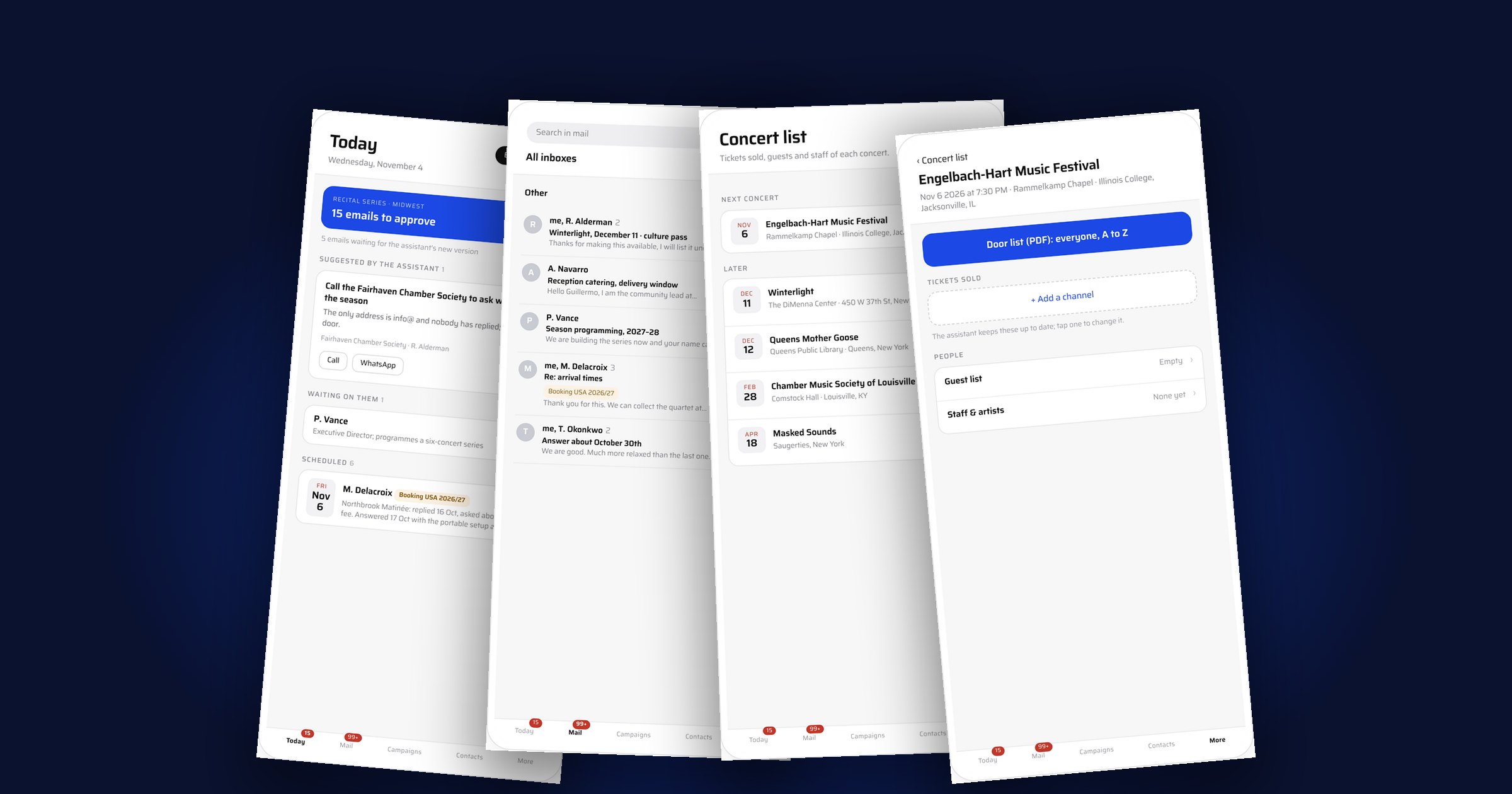
Four screens of Vela: the day's queue, the shared inbox, the season list and a concert
Role
Design and build, solo
Type
Internal tool, in daily use
Platform
Web, phone first
Built with
TypeScript · Gmail API · OAuth
Status
Live, behind a password
01

Booking a season is mostly correspondence.

A venue replies in March about a date the following February. The thread goes quiet. Three months later nobody can say whether the ball is in your court or theirs, and the only record is a mailbox that four different addresses feed into.

Every CRM on the market solves this by asking you to type it all in again: open the mail, read it, then go and tell the database what you just read. That second copy is the thing that always rots. The first time you are late, you stop updating it, and from then on the tool is lying to you.

So the design question was not how to lay out a contact record. It was how to not ask for one.

The screens in this case study are drawn, not photographed. The concerts are real and already public on the calendar; every name, address and message is invented, because the working app holds other people's correspondence.
02

Five tabs, and one of them is the whole job.

The structure is deliberately flat. Everything that needs doing today is behind the first tab; the rest is there for when you go looking. Nothing is more than two taps deep, because the app is used standing up.

Today
  • Drafts waiting for approval
  • Suggestions from the assistant
  • Waiting on them
  • Scheduled follow-ups
Mail
  • Every connected account
  • Threads tagged by project
  • Search across all of it
Contacts
  • People, found in the mail
  • Merged across addresses
  • Venues and organisations
More → Concerts
  • The season as a list
  • Tickets sold, by channel
  • Guest list, staff and artists
  • Door list as one PDF
03

A system that gets out of the way.

Colour · sampled from the running app
Paper
#F8F8F8
Every screen
Ink
#181818
Type, primary button
Action
#1848E8
The one thing to tap
Project
#D87028
Thread tags
Line
#D0D0D0
Dividers
Quiet
#787880
Secondary text
One blue, used once per screen. If two things on a screen are blue, neither is the thing to tap. The orange is reserved for project tags, so a glance down the inbox sorts the season from everything else.
Type · the phone's own font
24px
600
Concert list
16px
400
Tickets sold, guests and staff
15px
500
Engelbach-Hart Music Festival
Set in ui-sans-serif, system-ui, -apple-system — no webfont at all. The app should look like it came with the phone, and a tool opened forty times a day should not spend a request on type. Corners are 8px throughout.
04

The screens.

Today
Wednesday, November 4
Booking USA 2026/27 ⌄
Recital series · Midwest
15 emails to approve
›
5 emails waiting for the assistant's new version
Suggested by the assistant 1
Call the Fairhaven Chamber Society to ask who programmes the season
The only address is info@ and nobody has replied; a call may open the door.
Fairhaven Chamber Society · R. Alderman
Call WhatsApp ✓ Done
Waiting on them 1
P. Vance
Executive Director; programmes a six-concert series
Scheduled 6
FriNov 6
M. Delacroix Booking USA 2026/27
Northbrook Matinée: replied 16 Oct, asked about lighting and fee. Answered 17 Oct with the portable setup and the rates.
Screen 01

The day, not the database

The first screen answers one question: what is mine to do before tonight. It is ordered by who is blocked, not by date — things waiting on you first, things waiting on somebody else below, and promises you made for a date last.

  • AThe project chip at the top filters everything underneath, so the same screen works for a tour and for a season.
  • BThe assistant proposes and explains why. It never sends: the three buttons are the only exits, and one of them is "done, I did it myself".
  • CA scheduled item carries the history that produced it, so you do not have to open the thread to remember where it stood.
All inboxes···
Other
209 new
me, R. Alderman2 11:45
Winterlight, December 11 · culture pass
Thanks for making this available, I will list it under…
A. Navarro 11:31
Reception catering, delivery window
Hello Guillermo, I am the community lead at…
P. Vance 11:19
Season programming, 2027–28
We are building the series now and your name came up…
me, M. Delacroix3 09:13
Re: arrival times
Booking USA 2026/27
Thank you for this. We can collect the quartet at…
me, T. Okonkwo2 07:56
Answer about October 30th
We are good. Much more relaxed than the last one…
Screen 02

Every account, one thread

This is the part that makes the rest possible. Mail from all the connected accounts arrives in one list, and the project tag is applied to the thread rather than to a separate record, so filing happens as a side effect of reading.

  • A"Other" holds everything untagged. It is allowed to have 209 unread: that count is not a failure, it is the point of having a filtered view.
  • BA thread you are in reads "me, Name", the same phrasing the mail client uses, because this list has to be trusted instantly.
  • COne tag, in the project colour, never more than one per thread.
Concert list
Tickets sold, guests and staff of each concert.
Next concert
Nov19
The Queens Passport
Hunters Point Library · 47-40 Center Boulevard, Long Island City, NY
›
Later
Dec11
Winterlight
The DiMenna Center · 450 W 37th St, New York
›
Dec12
Queens Mother Goose
Queens Public Library · Queens, New York
›
Feb28
Chamber Music Society of Louisville
Comstock Hall · Louisville, KY
›
Apr18
Masked Sounds
Saugerties, New York
›
Screen 03

The season as a list

One concert is singled out and the rest are a group. A season is not a calendar problem for the person running it — it is a sequence of next things, and only the next one needs a decision today.

  • A"Next concert" sits outside the group and gets its own card. Everything after it is inside one bordered block, so the eye stops once.
  • BThe date badge carries the month in the accent and the day in full weight: readable at arm's length, in a venue, in bad light.
  • CThese are real dates, pulled from the same source as this site's calendar.
‹ Concert list
The Queens Passport
Nov 19 2026 at 7:30 PM · Hunters Point Library · 47-40 Center Boulevard, Long Island City, NY
Door list (PDF): everyone, A to Z
Tickets sold
+ Add a channel
The assistant keeps these up to date; tap one to change it.
People
Guest list
Empty›
Staff & artists
None yet›
Screen 04

One tap at the door

The screen is designed around the thirty seconds before an audience arrives. The door list is the only blue thing on it, at the top, full width, and it says exactly what the PDF will contain so nobody has to open it to check.

  • A"Everyone, A to Z" is the label because at a door you sort by surname, not by which list someone came from.
  • BEmpty states say "Empty" and "None yet" rather than hiding the row. A missing guest list is information.
  • CTicket channels are added, not configured: a box office, a culture pass and a ticketing site are all just a number with a name.
05

Four decisions that shaped it.

01

Read, do not ask

Accounts connect over OAuth. Past mail is imported once and then kept in sync, and every message records which account it arrived through. Nobody types a contact in, so there is no second copy to rot.

02

A person, not an address

People are matched on their email address, and one person's history is merged across all of their addresses and all of your accounts. The same programmer writing from a work and a personal address is one thread of history.

03

Nothing sends itself

The assistant drafts and proposes; a person approves. A suggestion can be edited, pushed to a date or dismissed, and the approval queue is the only way out of it. An automated apology costs more than it saves.

04

Phone first, and that is not a slogan

Bookings get answered between rehearsals, in a corridor, on a train. Every layout decision assumed a thumb and a small screen; the desktop is the same thing wider, not a different product.

06

Where it stands.

Vela is in daily use and behind a password, which is why this case study is drawn rather than photographed. It is one person's tool, built for one organisation's way of working, and it has not been tested with anybody else — so there are no numbers here, and no claims about how much time it saves.

What it has changed is smaller and easier to state: the inbox and the record are now the same object, so there is nothing left to forget to update.

TypeScriptGmail API OAuthVercel
Next case study Polen →